









































New to KubeDB? Please start here.
Reconfiguring Elasticsearch
This guide will give an overview on how KubeDB Ops-manager operator reconfigures Elasticsearch components such as Combined, Topology (master, data, ingest), etc.
Before You Begin
- You should be familiar with the following
KubeDBconcepts:
How Reconfiguring Elasticsearch Process Works
The following diagram shows how KubeDB Ops-manager operator reconfigures Elasticsearch components. Open the image in a new tab to see the enlarged version.
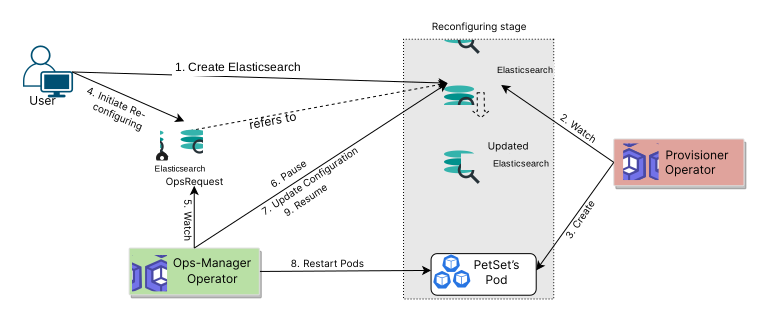
The Reconfiguring Elasticsearch process consists of the following steps:
At first, a user creates an
ElasticsearchCustom Resource (CR).KubeDBProvisioner operator watches theElasticsearchCR.When the operator finds an
ElasticsearchCR, it creates the required number ofPetSetsand related necessary stuff like secrets, services, etc.Then, in order to reconfigure the various components (ie. Combined, Topology) of the
Elasticsearch, the user creates anElasticsearchOpsRequestCR with desired information.KubeDBOps-manager operator watches theElasticsearchOpsRequestCR.When it finds an
ElasticsearchOpsRequestCR, it halts theElasticsearchobject which is referred from theElasticsearchOpsRequest. So, theKubeDBProvisioner operator doesn’t perform any operations on theElasticsearchobject during the reconfiguring process.Then the
KubeDBOps-manager operator will replace the existing configuration with the new configuration provided or merge the new configuration with the existing configuration according to theElasticsearchOpsRequestCR.Then the
KubeDBOps-manager operator will restart the related PetSet Pods so that they restart with the new configuration defined in theElasticsearchOpsRequestCR.After the successful reconfiguring of the
Elasticsearchcomponents, theKubeDBOps-manager operator resumes theElasticsearchobject so that theKubeDBProvisioner operator resumes its usual operations.
spec.configuration Fields
The ElasticsearchOpsRequest with type: Reconfigure uses the following sub-fields under spec.configuration:
| Field | Description |
|---|---|
configSecret | Reference to a Secret containing the full custom configuration file(s) for the database. |
secureConfigSecret | Reference to a Secret containing secure settings (e.g., keystore passwords). |
applyConfig | Inline map of filename: | content entries. Merged into the existing ConfigSecret. If no ConfigSecret exists, a new secret named {db-name}-user-config is created. |
removeCustomConfig | Set to true to remove all user-provided configuration and revert to the operator-generated defaults. |
removeSecureCustomConfig | Set to true to remove user-provided secure settings and revert to the default empty keystore. |
In the next docs, we are going to show a step by step guide on reconfiguring Elasticsearch components using ElasticsearchOpsRequest CRD.